Roles and permissions
The five roles you assign, and how the Access Matrix decides who reaches each indirect charge code.
What someone can do in BadgeOut depends on their role. Roles keep everyday tasks simple for members while giving you, as an administrator, the controls to run the organization.
The roles you assign
Five roles form a ladder, each adding to the one below:
| Role | What it adds |
|---|---|
| General User | Logs their own hours (including paid time off) and submits timesheets. |
| Reviewer | Reviews the timesheets of the people they oversee, ahead of approval. |
| Manager | Approves timesheets and assigns charge codes to members. |
| Admin | Manages the organization: members, charge codes, policies, and settings. |
| Super Admin | Everything, including deleting the organization. |
You pick a role when you invite someone and change it later from their member page.
Granting access
If a member can't reach a page or action, their role doesn't include it. Adjust their role to grant the access they need: assign Reviewer to let someone review their team's time, Manager to let them approve it, and reserve Admin for people who should configure the organization.
For indirect charge codes, and the leave banks they spend from, access is finer grained than the ladder. That's the Access Matrix.
The Access Matrix
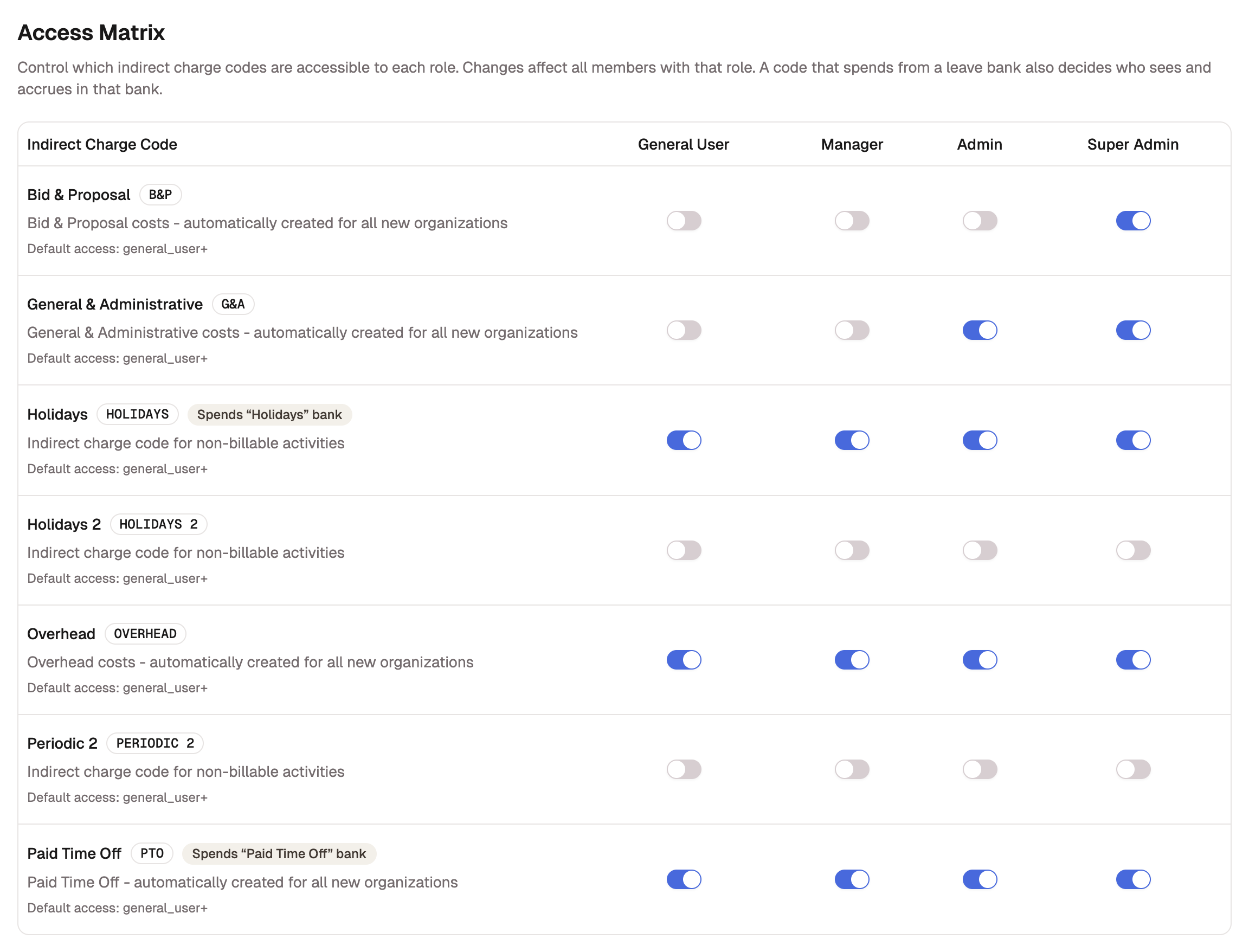
Open Settings, then Permissions, to reach the Access Matrix: one row per indirect charge code, one column per role, with a switch where they meet. Turning a switch on grants the code to everyone with that role; turning it off takes the role's access away. Changes apply to all members with the role at once.
Two things to know as you read it:
- A code that spends from a leave bank carries a badge naming the bank, such as Spends “Paid Time Off” bank. Granting the code grants the bank: whoever can charge the code sees the bank, accrues in it, and spends from it.
- Reviewer has no column. A reviewer reaches an indirect code only through an individual grant.
The matrix is the role half of the story. To give one person a code beyond their role, grant it individually from the code's page or the member's page; those grants sit on top of the matrix and survive its changes. Role changes never delete individual grants, and the matrix never shows them.