
Your PTO ledger
Check your leave balances, what you've earned and used, and your full history.
Your PTO ledger is the running record of your time off: what you've earned, what you've used, and what's left. Open My PTO Ledger whenever you want to know where you stand before you plan time away.
Your balance
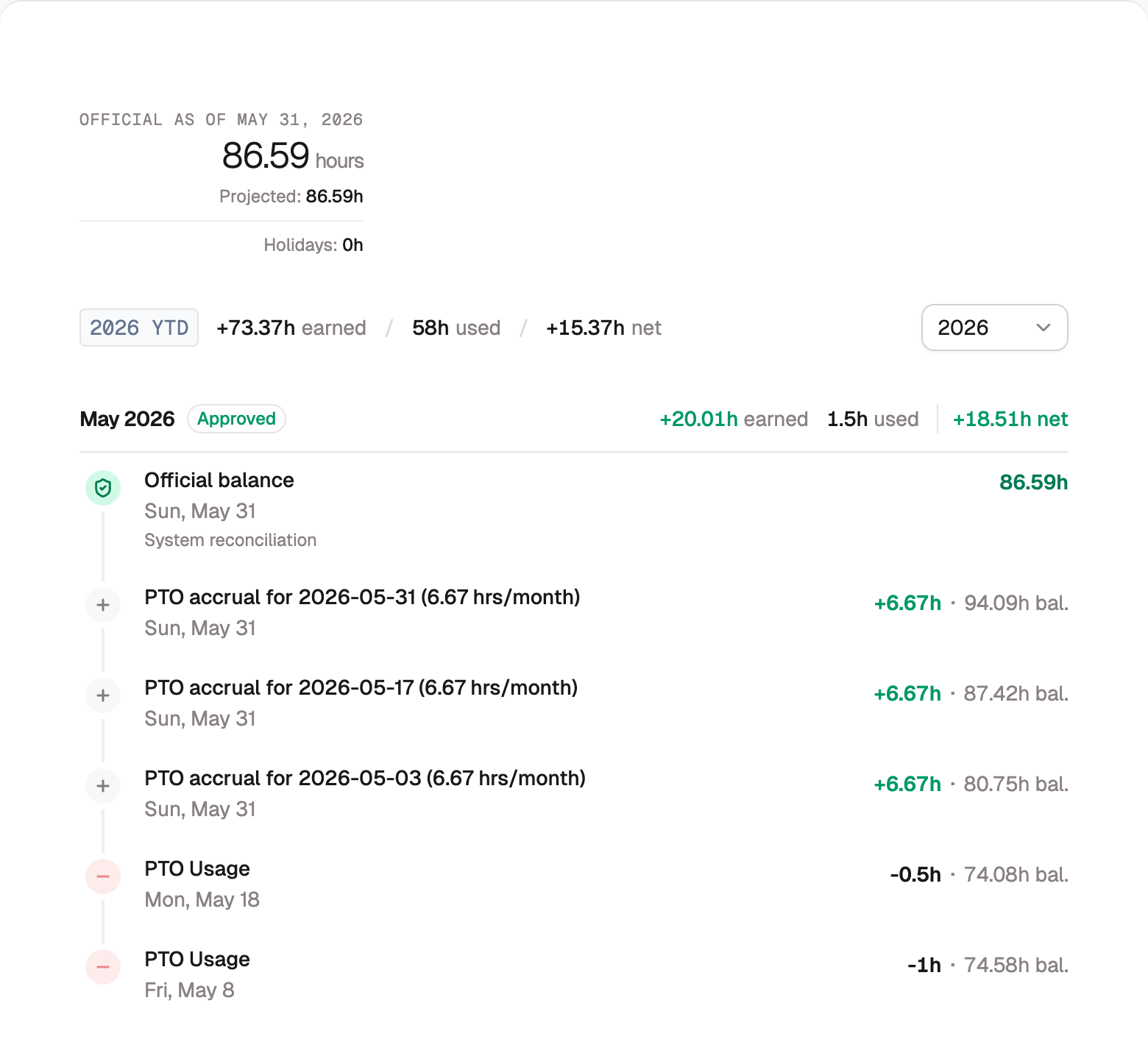
The top of the page shows your Official balance, the hours confirmed through your most recent approved timesheet.
Beside it, Projected estimates where your balance is heading as the rest of the year accrues, so you can plan a little ahead. The official number is what's locked in; the projected number is the forecast.
If you can spend from more than one kind of leave (Vacation and Holiday, say), each extra balance is listed under the header by name, and its entries appear in the same timeline. The list covers the leave banks you have access to, plus any bank you can no longer use that still holds hours for you. Your PTO balance is the one verified at approval; the others simply follow your ledger.
The year so far
The summary bar reads out your year to date in three numbers:
- Earned, the time that's accrued to you.
- Used, the time you've taken.
- Net, the difference between them.
Use the year selector to look back at a previous year. It only lists years your organization has been on BadgeOut.
Reading your history
Below the summary is your timeline, newest first. Each entry shows what happened, the date, the change in hours, and your running balance after it:
- Accruals add time as you earn it through the period. A banked holiday shows up this way too, crediting the leave balance your organization set for it.
- Usage draws time down when you take leave. Until the timesheet carrying the hours is approved, the entry wears a Pending badge (a giveback still awaiting approval gets one too); the badge disappears once approval makes it final. The month headers carry the same signal: the current month reads Pending until timesheet approval, and a past month shows Approved once every timesheet in it is through.
- Givebacks put time back when you return leave you'd logged. Enter negative hours on a leave code, and once that timesheet is approved the hours return to your balance.
- Carryover brings a balance forward into a new year.
- Your starting balance carries in what you'd already banked when your organization began using BadgeOut.
- Adjustments are hours an administrator added or removed by hand, for something the accrual rules don't cover. The entry's headline is the note they wrote, with their name below it, so you can see why your balance moved.
Official balance markers
Woven through the timeline you'll see Official balance rows. Each marks a point where your balance was confirmed, and says how: Verified at approval when a timesheet was approved, From a balance adjustment when an administrator adjusted it by hand, or System reconciliation when BadgeOut corrected the record. Entries above a marker are newer and count forward from it, so you can always tell which part of your balance is confirmed and which is still waiting on your next approval.
Tip
You don't request time off from this page. Schedule it on Team Schedule, and it shows up here as usage once it's on your timesheet.