1.2.1
New Leave Balance standard report
The Leave Balance Roll-forward report shows every member's official balance at the start and end of any date range, with the accruals, usage, and adjustments between.
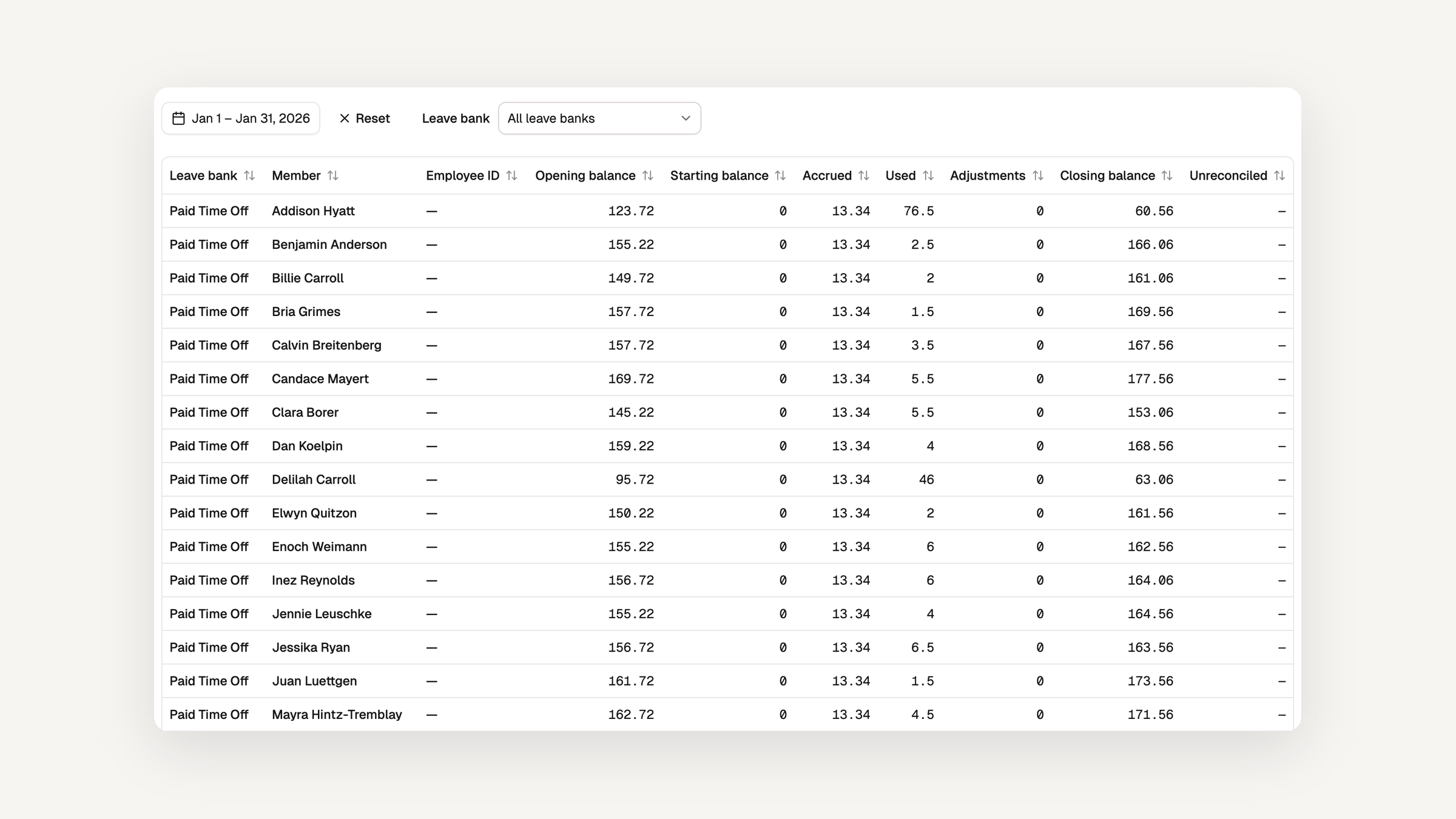
Closing a month means tying every leave balance out to payroll, and until now that meant opening one member's ledger at a time. The new Leave Balance Roll-forward standard report does it for the whole organization in one table.
- Each row is one member and one leave bank over the range you choose. It shows the official balance on the day before the range starts, the starting balances, accruals, usage, and adjustments dated inside it, and the official balance on its last day.
- An Unreconciled column shows what the closing balance carries beyond those rows, so drift from an attested checkpoint is visible instead of hidden.
- The report opens on the previous calendar month. A Leave bank select beside the date range narrows it to one bank, and the choice lives in the URL, so a filtered view is a link you can share.
- It exports to CSV and Excel like every other report, and its columns are also available as a feed for custom reports.
Find it under Reports → Standard Reports. It is available on every plan to administrators.
Read about the Leave Balance Roll-forward →
Bug fixes and accessibility enhancements
This release also fixes a handful of bugs and continues our work on accessibility across the app.