
Banked holidays
Credit a holiday's hours to a bank members spend later.
Not every team takes a holiday on the day it falls. Banking a holiday credits its hours to a leave bank instead, so a member who works through July 4th earns the time and spends it when it suits them.
How banking a holiday works
A banked holiday credits exactly one bank: a leave bank whose accrual strategy is Per banked holiday. The bank's Hours per holiday rate sets the credit, scaled by each member's FTE, so a full-time member on an 8-hour rate earns 8 hours per banked holiday and a half-time member earns 4. The credit lands in each member's ledger as an accrual on that bank when their timesheet for the period is approved. Each holiday names exactly one bank, so the hours can't double-count.
Any holiday you flag to bank hours is credited the same way, whether it came from the federal list or you added it yourself. Three things shape who gets the credit and when:
- The observed date is the day that banks. A holiday observed on a Saturday or Sunday banks nothing. Federal holidays get the federal rule on import (a Saturday holiday is observed the Friday before, a Sunday holiday the Monday after). For a holiday of your own, choose the weekday your policy gives as its Observed date. See Set the day a holiday is observed.
- A holiday for specific members banks only for them. Everyone else's ledger is untouched.
- One day off banks once per bank. When two holidays are observed on the same day and credit the same bank, that bank earns a single day. If they credit different banks, each bank gets its day.
If you don't have a per-holiday bank yet, create one first. See Leave banks.
Bank a holiday
- Open Settings, then select PTO & Holidays under Time-Related.
- Select Holidays, then the edit control on the holiday. The Edit holiday dialog opens.
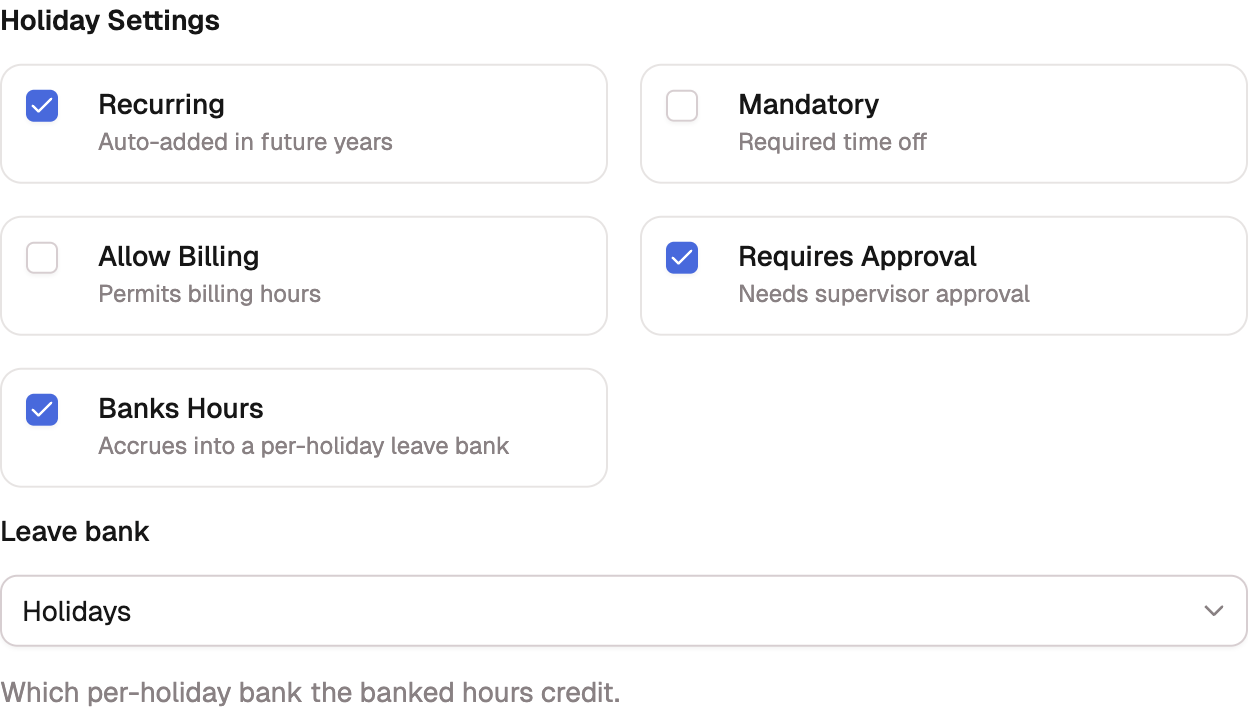
- Under Holiday settings, turn on Banks hours.
- Choose the bank in the Leave bank field. Only per-holiday banks are listed.
- Select Update holiday.
Timesheets that are already approved don't change when you turn banking on or move an observed date. The credit applies from the next approval onward. To correct a period that's already closed, use a manual adjustment.
What your members see
The credit shows up as an accrual in the member's PTO ledger, and the bank appears as its own tab on the timesheet's balance card once your organization has more than one bank. To spend the hours, members log time to an indirect charge code linked to that bank, the same way they log any other leave.